
Network Design: E01 (Network Fundamentals)
Building an Industrial-Strength Network with Linux: Basics of Networking
Introduction
Hello! My name is Utkarsh Maurya, and in this blog series, I want to show you how to build a real professional network using Linux. This series will cover the basics of networking, how everything works internally, and gradually move towards more advanced topics. Let’s start with the fundamentals of networking.
Basic Networking Concepts
Connecting Computers
Imagine you have multiple computers, perhaps laptops or desktops, and you want them to communicate with each other. This is essential for tasks like sending emails or sharing files. Here’s a simplified overview of how you can achieve this.
- Network Devices: Most modern computers come with built-in network devices that have an RJ45 port for connecting Ethernet cables.
- Switch: To enable communication, you can use a switch, which has multiple RJ45 ports. Connect each computer to the switch using Cat5 or Cat6 cables.
Each network interface has a unique MAC address (Media Access Control address), a 6-byte (48-bit) physical address that should be unique worldwide.
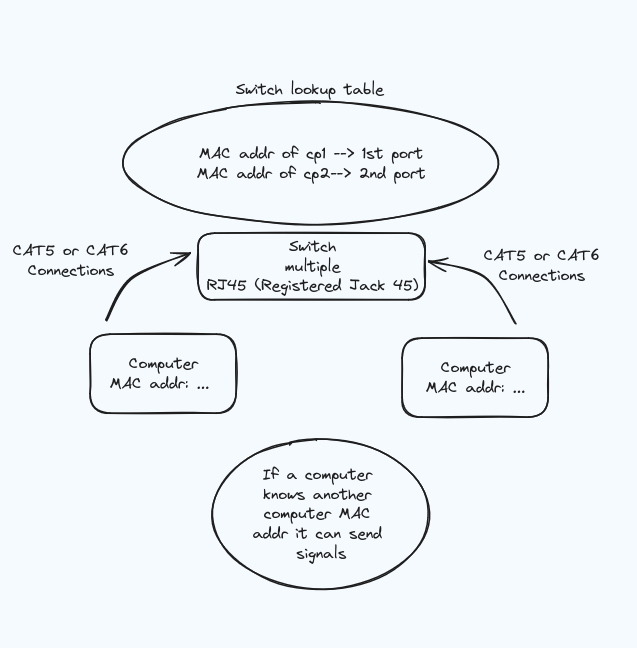
Making a Lookup Table in a Switch
To create a lookup table in a switch, every device must know which port number to use. This is achieved by broadcasting the port number to every port present on the switch.
- Broadcasting Port Numbers: Send a message to the special broadcast address
ff-ff-ff-ff-ff-ff. The switch will broadcast this signal to every port except the one from which it originated. - MAC Address Table: The switch builds a MAC address table by learning which MAC address is connected to which port based on the incoming frames.
Broadcast Storm
A broadcast storm is a network condition where there are so many broadcast frames circulating that it overwhelms the network, leading to potentially network failure. Proper network design and management protocols are essential to prevent this.
ARP Table
The ARP (Address Resolution Protocol) table is empty when you start your computer. When you attempt to connect to another computer’s IP address, your computer broadcasts an ARP request asking, “Who has this IP?” Only the device with the correct IP address will respond, while others will ignore the request. This process is automated, but keeping track of every IP manually can be tedious.
Dynamic IP Address Assignment with DHCP
Instead of manually assigning IP addresses, you can use a DHCP (Dynamic Host Configuration Protocol) server. Here’s how it works:
- Broadcasting for IP Address: When a device joins the network, it broadcasts a message asking if any DHCP server can provide an IP address.
- DHCP Acknowledgement: The DHCP server responds with an available IP address and stores this information in its lookup table to avoid assigning the same IP to another device.
- Lease Time: The IP address is leased to the device for a specified period. The device must periodically renew the lease, confirming it still uses the IP address.
If a device is shut down for an extended period (e.g., you go on holiday), its IP address might be reassigned to another device. Upon returning, the device will request a new IP address from the DHCP server.
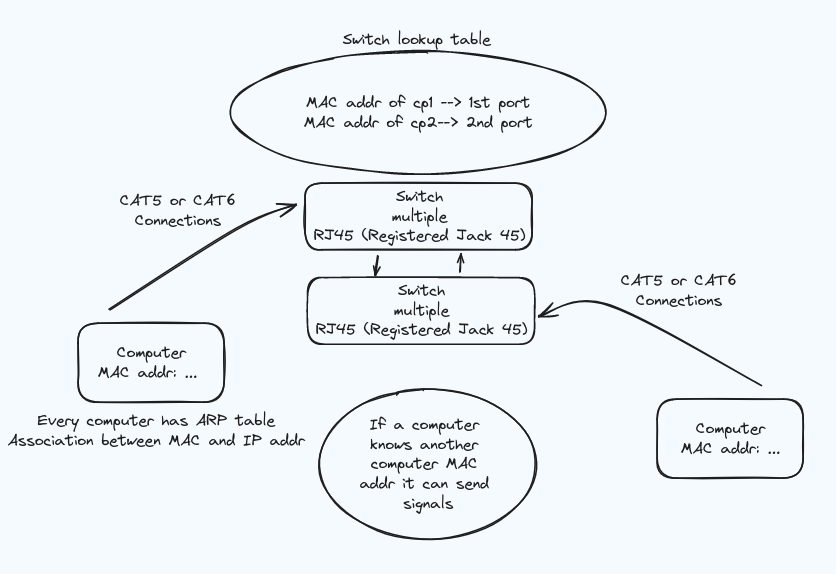
Name Resolution with DNS
Keeping track of dynamic IP addresses can be challenging. This is where the DNS (Domain Name System) server comes in. Each computer on the network is given a hostname (e.g., SQL_SERVER, CLIENT_SERVER), making it easier to identify and connect to other devices.
- Local DNS Resolution: If you want to communicate with local servers, the DNS server will resolve hostnames to IP addresses within the network.
- External DNS Resolution: For external sites like
google.com, the DNS server looks up the IP address. If it does not have the information, it can query upstream DNS servers (e.g.,8.8.8.8, Google’s public DNS) or return an error if the address cannot be found.
Routing and Default Gateway
For communication outside your local network, your device sends data to a default gateway (usually a router). The router then forwards the data to its destination, potentially traversing multiple networks.
- Subnet Mask: Determines which portion of an IP address is the network address and which is the host address. A common subnet mask is
255.255.255.0, meaning the first three octets identify the network. - CIDR Notation:
10.1.1.10/24means the first 24 bits are the network part of the address.
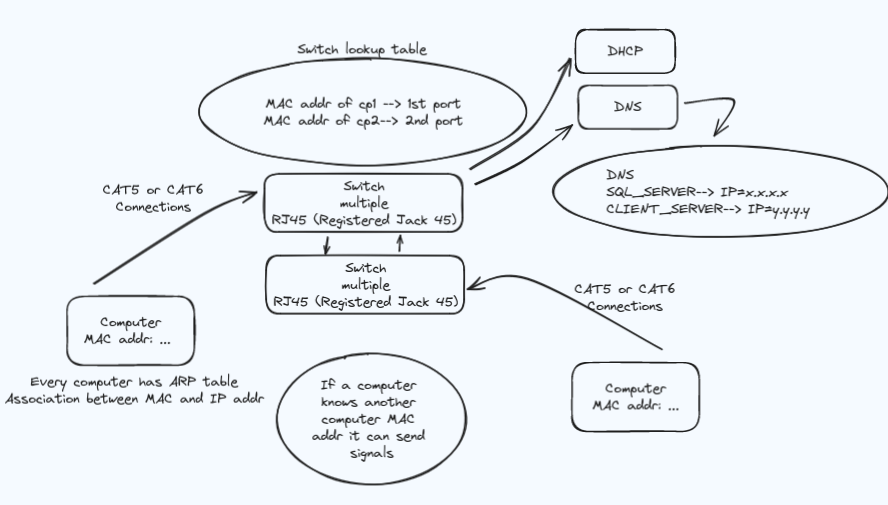
NAT and Masquerading
Routers often use NAT (Network Address Translation) to manage traffic between local devices and the wider internet. They replace local IP addresses with the router’s public IP address, allowing multiple devices to share a single public IP.
Summary
Understanding these basic concepts is crucial for building a robust network. We covered:
- Connecting computers using a switch and Ethernet cables.
- Creating a lookup table in a switch and understanding broadcast storms.
- MAC addresses and their role in Ethernet frames.
- Dynamic IP addressing with DHCP.
- Logical addressing with IP addresses and ARP.
- Name resolution using DNS.
- Routing and the role of the default gateway.
- Network segmentation with subnet masks and CIDR notation.
- NAT and IP masquerading.
In the next post, we will delve into more advanced topics like VLANs (Virtual LANs). Stay tuned for more insights into building a professional network using Linux!
See you next time!