
How files in Linux work
How files in Linux work
Understanding how to work with files and arrange them in directories is one of the fundamental computing principles we are taught. Reading data that has been stored in a file later on is the usual use case. But the idea of files and directories can be considerably more useful than merely saving and retrieving a few bytes from a local storage device. This article will discuss filesystems, how Linux manages file access in the kernel, files as a computing abstraction, and even how to create custom filesystems using FUSE.
Table of Contents
- File hierarchy in Linux
- Purpose of the filesystems
- Example of mounted filesystems
- Filesystems that store on block devices
- Do filesystems have to be backed by a block device?
- Filesystems not backed by a block device
- Filesystem implementation as a kernel driver
- Filesystems as an API
- FUSE filesystems
- Conclusion
File hierarchy in Linux
Linux files are arranged in a hierarchy that resembles a tree. Files and folders are arranged in a tree structure starting with the root directory ‘/’. An illustration of a section of a Linux system’s file hierarchy may be found below. An example of a file hierarchy:
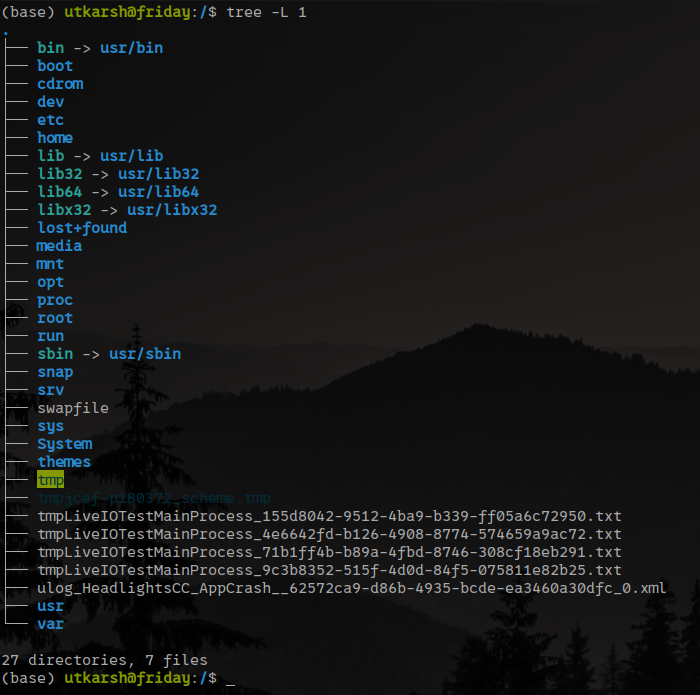
For the most part, we will ignore directories in favour of files in the remaining sections of this blog. So, the question is: What happens on the system when someone reads or writes data from a file?
The operating system kernel is in charge of servicing requests to the filesystem. Hence a system call is needed to make such a request to the kernel. How system calls work is outside the scope of this article, but whenever you use a library to interact with a file, under the hood, a CPU instruction will be invoked which will hand over a request to the kernel asking it to process a filesystem request. In a simplified view, your application at this point waits for the kernel to come back with the response; after the response is obtained, the application resumes with the execution.
The requests roughly come in the form such as the following:
For the file at /home/utkarsh/foo.txt, read 100 bytes at offset 0x102.
Purpose of the filesystems
What does the kernel exactly do when it receives a request to process a file operation request? The answer is it depends on the path of the file in question. The file hierarchy can behave differently depending where in the file tree you are working. For the request such as the one above, subtrees of the file herarchy can do different things. The directory nodes in the hierarchy at which the behavior changes from there and below are called the mount points. We say that a filesystem is mounted at that point, which simply means that we’re registering a set of behaviors for the requests such as the one above from that point in the hierarchy and below.
Each filesystem simply defines behavior for the requests below:
- What to do when a file is read?
- What to do when a file is written?
- What to do when a file is deleted?
- What to do when a directory is created?
- And so on…
And so a filesystem can be viewed as nothing more than a set of functions that get invoked for each of the requests above (and this is pretty much how filesystems really are implemented in Linux, more below).
Some of the filesystems you will commonly hear about in the Linux world are: ext2, ext4, SquashFS, ReiserFS and so on (there are many out there).
Example of mounted filesystems
The example above is a piece of the filesystem hierarchy on a sample Linux system. There are 4 different mountpoints:
- /: root is mounted using the filesystem ext4 backed by device /dev/sda1
- /media/usb-1: USB stick 1 is mounted using the filesystem ext4 backed by device /dev/sdb1
- /media/usb-2: USB stick 1 is mounted using the filesystem ext2 backed by device /dev/sdc1
- /home/utkarsh/fun: filesystem foofs
What is the true meaning of all this? This means that depending on the precise path of the file, four alternative outcomes are possible for a file operation, such as reading. How is what occurs decided upon? First, we need to locate the mountpoint for the filesystem of the relevant file. To accomplish this, just follow a file’s parent directories until you reach the first mountpoint.
For example, for the file /home/utkarsh/work/Code.java, we first check /home/utkarsh/work, then /home/utkarsh, then /home and finally /. Root is the lowest mountpoint under which the request filed resides. This means that the read operation is handled by the filesystem ext4 backed by the block device /dev/sda1.
Similarly, for the file at /home/utkarsh/fun/Foo.txt, the mountpoint is at /home/utkarsh/fun and that means the requests are handled by the filesystem foofs. Note that in this case, there is no block device backing this filesystem. What does it mean?
Filesystems that store on block devices
A filesystem stores some data on a block device and exposes certain data as files in its most widely recognised form. Devices that offer arbitrary access to data organised into blocks of a specific size are known as block devices. Block devices are merely enormous arrays of bytes, to put it simply.
Since we’re just working with arrays of bytes at the back, how do filesystems manage to have this hierarchical representation of the files?
The answer is that the filesystems maintain some sort of a table in a special location (or multiple locations) on the disk where pointers to the individual files are kept. We can thus imagine an extremely simple filesystem in which we say we can have up to 1023 files. Each file can be no more than 1 MB. At the beginning of the block device, we store the table of file entries. In fact, to keep things simple, for each table entry we preallocate 1 KB for all the file-related metadata, and thus our filesystem table is 1023 x 1 KB in size, and for simplicity we can leave 1 KB of empty padding. The first 1 MB of the block device is reserved for the file metadata. Let’s further assume that we do not support directories in our filesystem: all the files are at the root of this filesystem. Therefore, the filesystem table can be very simple, it maps the filename to the file region, and we have 1023 regions since we assume we support up to 1023 files. A block device of 1 MB + 1023 x 1 MB = 1024 * 1 MB = 1 GB is needed for this set up.
Our filesystem services requests are sent in a straightforward manner: after receiving a file name, we look up the filename in the filesystem table to determine which file area the file is stored in. After that, we handle the request as though it were a simple byte array (a subarray of our block device) and handle the file area appropriately. Since the file is perceived by the filesystem requests as a continuous byte array, the implementation is straightforward: just work with the array’s chunks at the specified offset.
| Address range | Content |
|---|---|
| 0x0000 0000 - 0x0000 03FF (first 1024 bytes) | FS entry - foo.txt |
| 0x0000 0400 - 0x0000 07FF (second 1024 bytes) | FS entry - bar.txt |
| 0x0000 0800 - 0x0000 0BFF (third 1024 bytes) | FS entry - baz.txt |
| … | … |
| 0x000F FC00 - 0x000F FFFF (1024th 1024 bytes) | BLANK PADDING |
| 0x0010 0000 - 0x001F FFFF (2nd 1 MB) | foo.txt content |
| 0x0020 0000 - 0x002F FFFF (3rd 1 MB) | bar.txt content |
| 0x0030 0000 - 0x003F FFFF (4th 1 MB) | baz.txt content |
| … | … |
The filesystem driver will, for instance, begin reading the filesystem table at the beginning of the block device (disc) if an action is required on bar.txt. Upon discovering that it is the second entry in the table, it will know that the file is located in the address range 0x0020 0000 - 0x002F FFFF on the block device and will convert all operations performed on that file to operations performed on the bytes in that address range.
Do filesystems have to be backed by a block device?
Absolutely not, and this is where the power of the filesystem abstraction actually lies. In fact, many of the files on your typical Linux installation belong to the filesystems that have nothing to do with the storage on a block device. For instance, if you interact with the files under the /dev/ tree, you will actually be interacting with the devices within your machine.
Interestingly, as we mentioned above, the block devices are just byte arrays and Linux actually allows you to directly view your block devices as such! Your hard drive may appear as /dev/sda, and you can in fact open that file and treat it as a byte array and operate all over it, though you are highly likely to break something in your software if you do that. The reason why is exactly what we talked about in the previous section: the filesystem has its way of storing the hierarchy of files somehow within this byte array, and the filesystem table data may be scattered all over the block device — you are likely to corrupt some of the data important for maintaining the filesystem by treating your block device as a sequence of bytes.
Filesystems not backed by a block device
What can the filesystem not backed by a block device do? Pretty much anything! There are many different filesystems available out there. We can imagine a simple filesystem that is read-only and offers 100 files named foo1.txt, foo2.txt, …, foo100.txt. In the i-th such file, the contents are string ‘foo’ repeated i times. How would the filesystem then process a read operation of some bytes at a certain offset? A simple and naive implementation is to figure out which fooi.txt is accessed, form the content of the file on the fly by repeating the string ‘foo’ i times, and then returning a substring of that content. The pseudocode is below.
function readfile(file_name, offset, count): bytes {
  /* skip first 3 characters foo */
  int foo_number = file_name.substring_between(3, file_name.find(".txt")).parse_int()

  string file_content = "foo".repeat(foo_number)
  return file_content.substring(offset, count)
}
Note that there is no concept of storing any bytes anywhere and later retrieving them. There is especially no reference to any storage device such as a block device. All the contents are computed on the fly and this can be the trade-off for some filesystems: computational power is sacrificed in order to reduce the physical storage footprint. You can now imagine how even the physical contents on the block device do not necessarily need to correspond to what the software sees when reading the file. The filesystem can spend some computational power to encrypt, compress, or otherwise process the bytes when storing them on the disk, and do the reverse operation (decrypt, decompress, etc.) to provide the contents back. This means, for example, when it comes to compression, that even if you have a 1 GB block device, you can actually store more than 1 GB worth of data on the device, at the expense of spending some CPU cycles to do the data processing.
Filesystem implementation as a kernel driver
Filesystems you encounter on a daily basis like ext4 are baked directly into kernel, meaning that the kernel comes with this functionality inside. Implementing these drivers boils down to implementing the read, write and other operations like the one above using the kernel API. Simplified explanation here is that the kernel API is C-based and limited, meaning that it is not possible to use any library like REST libraries to access the storage over the Internet, etc. This does not mean, however, that such filesystems are not possible — the section below about FUSE explains how to achieve that, but it is not trivial using the kernel API.
Writing kernel drivers, however, is outside the scope of this article.
Filesystems as an API
With all of this in mind, we can now consider filesystems to be an API rather than just a way to store and retrieve bytes from a device. Filesystems and object-oriented programming may be similar in that Linux has an interface named filesystem, which concrete filesystems are just implementations of.
What’s the benefit of this abstraction? Basically all the applications available on the machine know how to consume this interface! For example, if your filesystem is backed by some cloud storage, the applications that operate on these files do not need to know anything about it necessarily. You can still open the photos with your favorite photo viewer, you can still read PDFs with your PDF reader, you can use rsync to backup your data in the cloud, etc. Granted, the performance may be slower, depending on the network connection and the quality of implementation, so as long as the application does not crash because the file operations are simply slow, the applications will be compatible with your filesystem.
FUSE filesystems
FUSE (Filesystem in Userspace) is a Linux technology that enables us to write filesystems with code in user space, meaning code that can do anything and is not restricted by kernel APIs, like it is in the case of kernel modules or drivers. FUSE filesystems could be written in something like Python and use any Python libraries, e.g. libraries for accessing AWS S3 storage.
The FUSE concept is straightforward: it starts a FUSE server process in user space and offers writing, reading, and other functions, just like kernel filesystems do. The distinction lies in the fact that VFS is unable to access that functionality directly; instead, it uses the FUSE kernel module, which traverses the boundary between kernel and user space to interact with the FUSE server and then returns the server’s answer.
As a result, the programming architecture remains mostly same, but navigating across the kernel/user space boundary will cost you in terms of performance. The trade-off is now clear: obtaining user space code’s infinite flexibility comes at the expense of slower execution and higher memory consumption.
Conclusion
The main purpose is to shift the mindset towards thinking of filesystems as APIs, rather than byte storage.
I hope you like it! Please consider following on Twitter/X and LinkedIn to stay updated.